AntiRaidAntiRaid

Whois

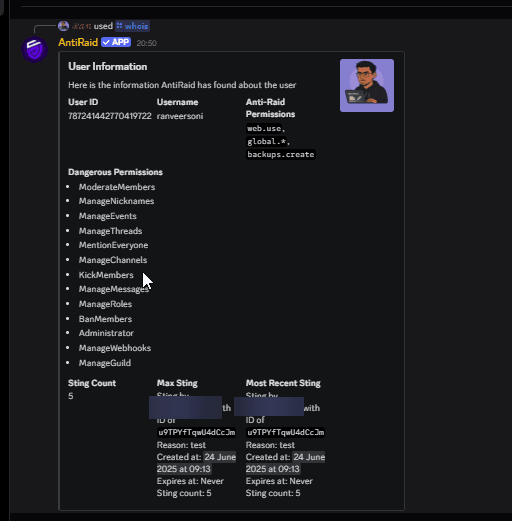
Look up information about a member — account age, server permissions, and moderation history.

Updated April 11, 2026

The /whois command gives you a quick overview of any member in your server. It's useful for vetting suspicious accounts, reviewing a user's permissions, or checking their moderation history before taking action.

Usage

/whois user:@username

The user parameter is optional. If you omit it, AntiRaid shows information about yourself.

Any member can run this command — no permission node is required.

What's shown

SectionDetails
General infoUsername, display name, account creation date, server join date, and whether they are a bot
Sting countHow many moderation stings (recorded actions) this user has accumulated
Discord permissionsThe Discord permissions the member currently has based on their roles
AntiRaid permissionsWhich AntiRaid permission nodes the member holds

Whois command output

Checking account age

New accounts created within the last day or two are often linked to raiding or ban evasion. The account creation date in /whois makes it easy to spot them.